Periods that match the school year
Set up a semester or a whole school year, switch between periods, mark the current one with a star and close the ones that are done.
For students and apprentices
Schuno records your school grades and works the same way your school does — with subject weighting, a factor for every single grade, a separate core subject average and a grading scale of your choice. No account, no ads, no tracking.
See the features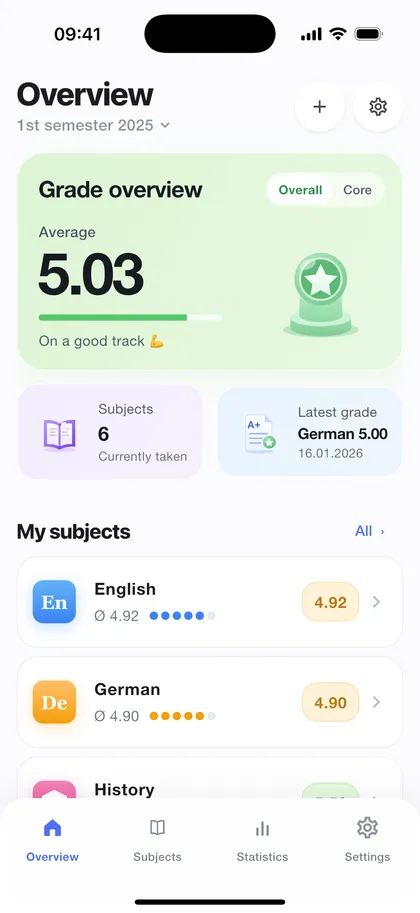
Data Not Collected
That is Schuno's privacy label in the App Store — no data is collected.
No account
Open it and start. No sign-up, no email address, no password.
No ads
No advertising, no crash reporting, no analytics services, no third-party SDKs.
Four languages
German, French, Italian and English — including the subject names.
Features
Not a generic grade calculator, but an app for report cards where subjects count differently and core subjects are shown separately.
Set up a semester or a whole school year, switch between periods, mark the current one with a star and close the ones that are done.
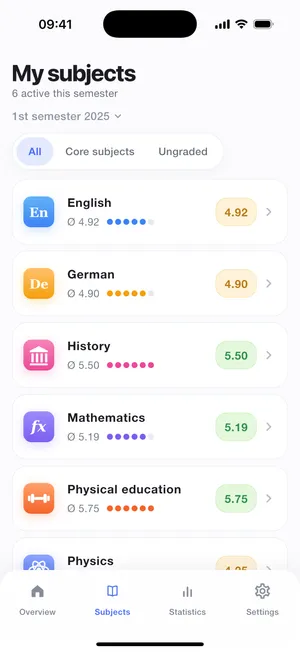
Each subject carries its own weight — 0.5×, 1.0× or 2.0×, for example — and can be marked as a core subject. 18 standard subjects, or add your own.
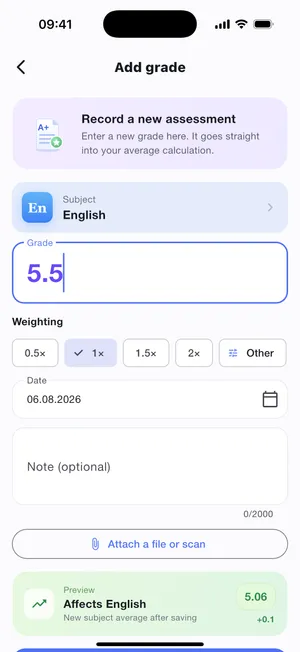
A semester exam does not count the same as a vocabulary test. Pick 0.5×, 1.0×, 1.5×, 2.0× — or a custom factor from 0.01× to 10×.
Subject, overall and core subject averages are shown separately. And every calculation is laid open instead of just asserting a result.
Photograph the exam sheet directly, or attach it from your photo library or as a file — and open it later straight from the app.
The grade history as a curve, the subject comparison at a glance and short notes on where things currently stand out.
In three steps
From the empty app to a full picture of your report card — with no setup effort.
Choose a semester or a school year, name it, set the start and end dates — with your school's grading scale. You pick the subjects in the second step, from the catalogue or as your own subject.
Grade, date, factor and an optional note. Before you save, Schuno shows you how your average will change.
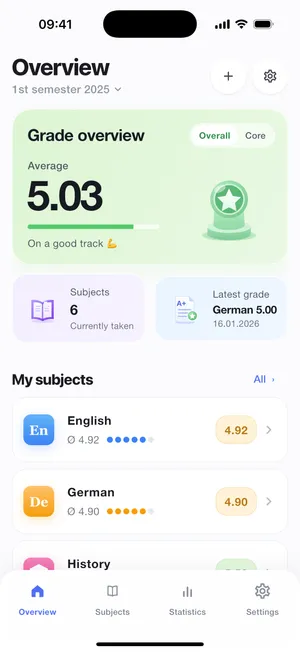
The overview, the subject list and the statistics update immediately. Subject average, overall average and core subject average are visible at all times.
And at the end of the semester: prepare the next period from the current one — the subjects carry over, the grades do not.
Grade goals
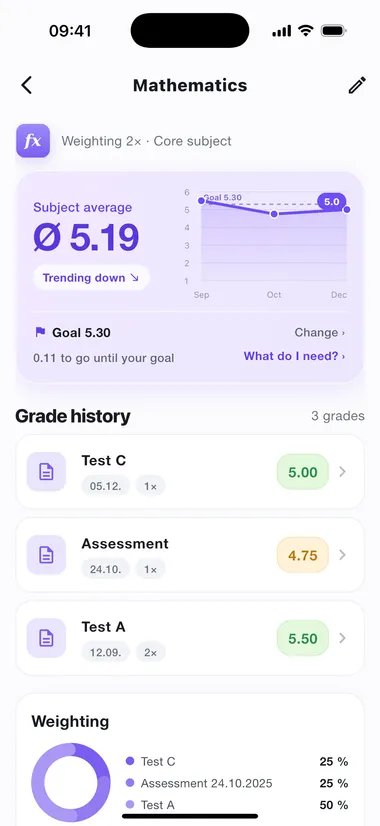
You can set the average you are aiming for — for every subject, for your overall average and for your core subjects. Schuno then shows how far you still have to go instead of leaving the arithmetic to you. Without a goal, the interface stays exactly as it was.
The distance, not mental arithmetic
"0.11 to go until your goal" sits right inside the average card — and "Goal reached" as soon as you are there.
"What do I need?"
The calculator names the grade your next exam needs. You pick the factor it should count with.
Goal line in the trend
In a subject's grade trend your goal runs across the chart as a fine dashed line.
Goals are voluntary and belong to the period you set them in — they do not carry over into the next semester by themselves. The calculator gives you a bearing based on the grades you already have, not a forecast.
Grading scale
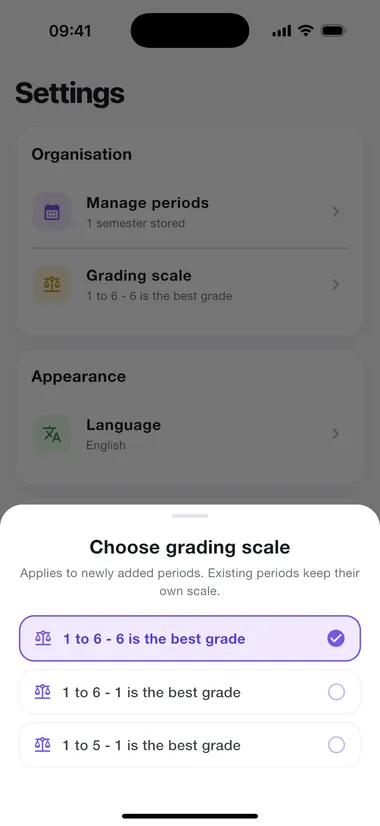
In Switzerland 6 is the best grade, in Germany it is 1, and in Austria the scale only reaches 5. Schuno knows all three shapes and works out averages, colours and trend lines in the right direction for each.
1 to 6 - 6 is the best grade
Switzerland, for example
1 to 6 - 1 is the best grade
Germany, for example
1 to 5 - 1 is the best grade
Austria, for example
The scale belongs to the period, not to a global setting. That matters when you change schools: grades you have already entered must not suddenly mean something else. Existing periods therefore keep their scale, and the setting applies to newly added ones.
Privacy
Schuno has no servers of its own and no analytics services. Your grades live on your device and in your private iCloud — Apple syncs them there for your other devices, and we never get to see them.
Read the privacy policyThe app sends nothing to us. If you tap "Contact" in the settings, all that happens is your mail app opening with our support address — nothing goes out until you send it.
A look inside
Calm surfaces, clear numbers, no effects that distract from what matters.
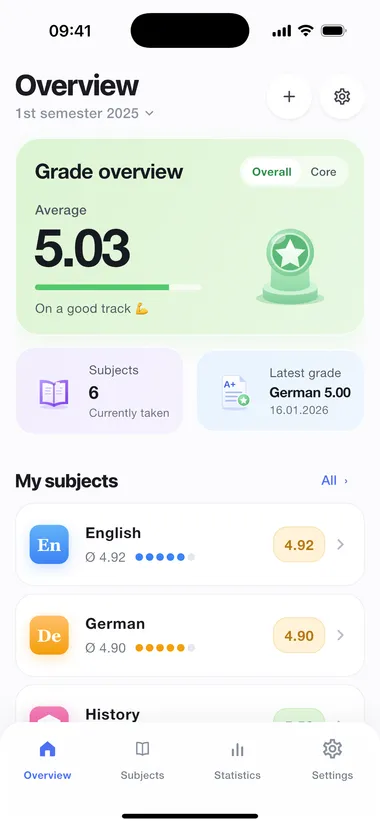
Overview with the overall average and your latest grades
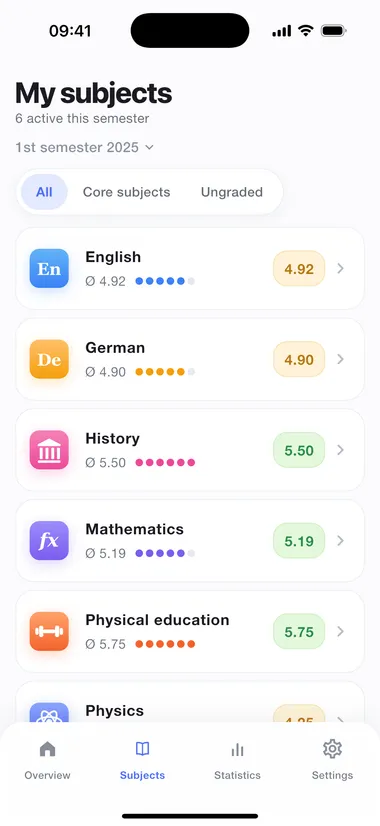
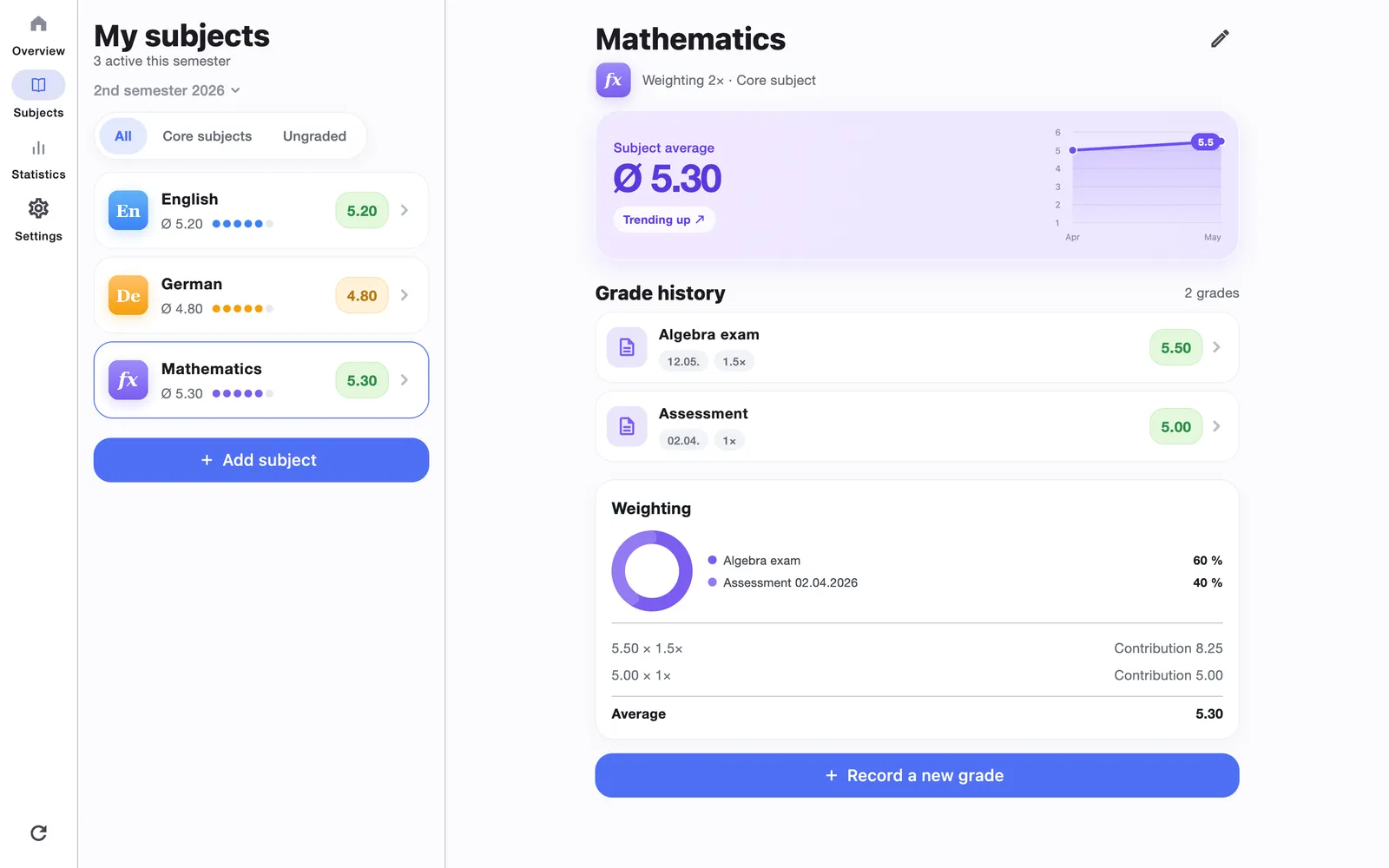
All subjects with their weighting and subject average
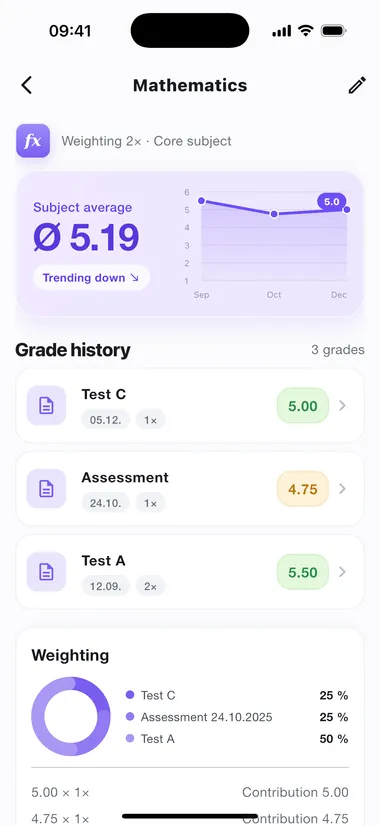
A single subject in detail — every grade with its factor
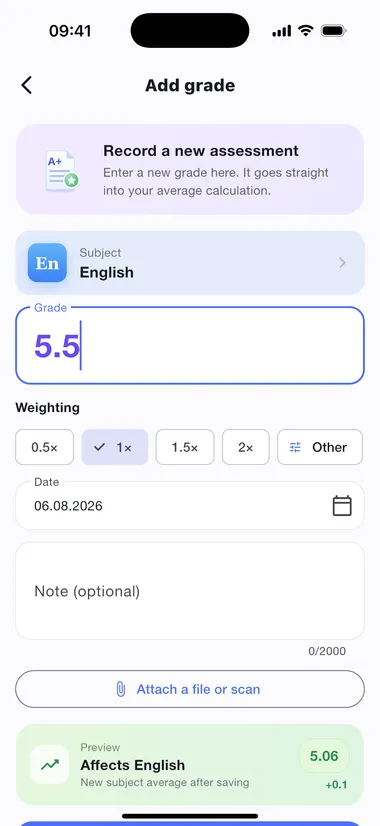
Adding a grade: value, factor, date and a preview of the effect
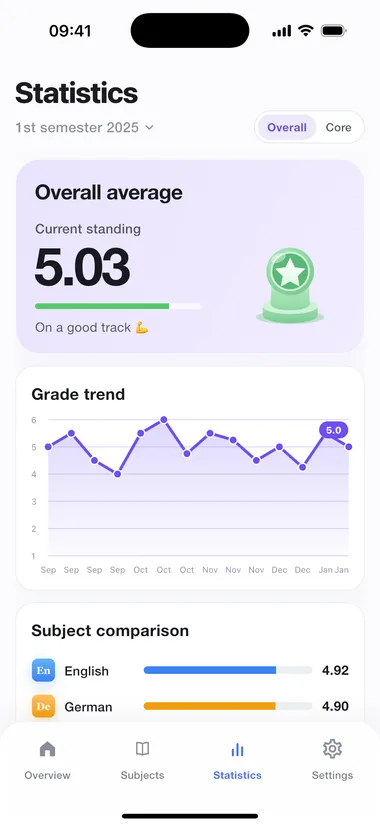
Grade trend and subject comparison in the statistics
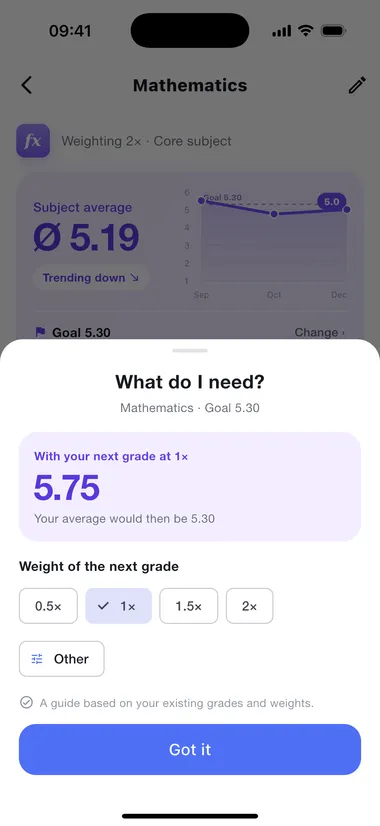
"What do I need?" works out the grade your next exam needs
New for the Mac
The same grades, built for a window: a sidebar instead of a tab bar, subject list and detail side by side, forms as pages. iCloud keeps the Mac and the iPhone in step — and the app stands on its own, too.
Multilingual
Schuno speaks German, French, Italian and English. It is not only the menus that are translated, but the subject names in the catalogue as well.
The app follows your device's system language to begin with; in the settings you can pick a fixed language at any time. Grade values, factors and dates are formatted the same way in every language.
Questions
What comes up most often — answered briefly.
Schuno is free. There are no in-app purchases, no subscriptions and no advertising. There is no paid version with extra features either.
No. There is no sign-up and no login. You install the app and start right away.
On your device in the app's protected data folder and — for syncing between your devices — in your private iCloud. They are never transferred to our servers; we do not run any.
Yes. Your data lives in your private iCloud and is therefore available on every device where you are signed in with the same Apple ID — on the iPhone and on the Mac alike.
Most likely yes. Schuno knows three shapes: 1 to 6 with 6 as the best grade, 1 to 6 with 1 as the best grade, and 1 to 5 with 1 as the best grade. The pass mark is 4 in each case. Point-based or letter-based systems are not covered yet.
Yes, entirely optional: for every subject, for your overall average and for your core subjects. Schuno then shows how far you still have to go, draws the goal as a fine line in the grade trend, and works out under "What do I need?" which grade your next exam needs. Without a goal, everything stays as it was.
No. Schuno is made for students and apprentices who manage their own grades. There is no class administration, no multi-user features and no teacher portal.
Yes. In the settings you pick between light, dark and the system setting — independently of the rest of your iPhone or Mac. Left on the system setting, Schuno switches along with your device; on the iPhone including a dark app icon, when the Home Screen's icon appearance is set to "Dark" or "Automatic".
On the iPhone from iOS 18.0 and on the Mac from macOS 10.15 — both share the same grades via iCloud. An Android version is in preparation.
You delete individual grades, subjects and periods directly in the app — the deletion syncs to your other devices as well. If you want to remove everything, uninstall the app and delete the Schuno data in your iCloud settings under iCloud Drive.
One period, a handful of subjects, your grades — and your average finally matches what ends up on your report card at the end of the semester.
Questions before you download? Write to us at contact@schuno.app